
ArtIME Japanese Input1.3 - Get APK
You'll be able to download in few seconds.
Publisher Description
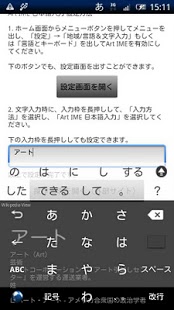
An ArtIME Japanese input is the new software for a Japanese input which has a beautiful user interface and interactive nature.
If you have any questions or bug,
Thank you for e-mail or comment at http://codedesign.jp/artime/.
In addition, the next version has significant changes are planned.
Any suggestions or comments would be appreciated.
Based on the OpenWnn with a high-speed conversion function, we propose operational feeling close to the iPhone, such as integration with Wikipedia and the design of unprecedented, new ways to use the software keyboard.
1. Installation
Please download and install the installation method from the market site according to Android Market or it.
The icon for a setup goes into an application list automatically after installation.
2. Validation
This software is IME (Input Method Editor), and you can use it only by installing.
An ArtIME Japanese input can be validated by following the following procedures.
- Start an ArtIME Japanese input after installation.
- Push "explanation of setting method" button.
- Push the button "which opens a setting screen."
- Push the check button on the right of a "Art IME Japanese input" of "language and a setup of a keyboard."
- Return to the screen of the ArtIME, please press the button "Select Input Method".
- Please select the Japanese Input ArtIME.
Above, validation is completion.
3. Usage
The keyboard is active after validation finishes.
- Input Japanese.
Push the earth mark of a keyboard several times, or there is long aggressiveness [ an earth mark ], and please choose a "Japanese ten key" or a "Japanese Roman alphabet."
- Input English.
Push the earth mark of a keyboard several times, or there is long aggressiveness [ an earth mark ], and please choose "English (US)."
- Wikipedia automatic search
The ArtIME Japanese input has set the first keyboard design as Wikipedia.
If a character is inputted, and it is an item in Wikipedia, it will search automatically and will display.
If long aggressiveness [ this state / character selection keys, such as "ABC", ] when there is search which was worrisome by Wikipedia, a browser will be started and it will jump to the applicable page of Wikipedia.
- Social IME
From V1.1.1, it corresponded to Social IME.
Please, start a setup and choose Social IME from the item of "network IME". [ an earth key ] [ long ]
After character input conversion, when there is no candidate and Conversion View is expanded, it refers to Social IME automatically and pulls out a candidate.
- Mushroom
A mushroom function can be used on a par with IME represented by Simeji.
Before conversion, please and choose a mushroom, after inputting a character. [ an earth key ] [ long ]
- Cursor pad
As for the case of QWERTY, a cursor pad comes and starts the key as which ■ on a space is displayed in the case of a ten key state by long aggressiveness [ a Shift key ].
The function of a cursor pad is as follows.
- If a cursor pad is traced, selection is started in - double click which can move a cursor, and it can cancel in a single click.
- The cut copy paste of a character string is possible respectively at lower cut /copy/paste.
- When you end a cursor pad, please push upper right x button.
- Various setup is possible, if and a setup is chosen. [ change / of a setting screen and a keyboard design ] [ an earth key ] [ long ]
Although there are eight kinds of designs of a keyboard, the Wikipedia search service does not operate by any keyboards other than "Wikipedia."
■ Known Bug:
- If a theme is made into Wikipedia in -HT-03A into which a keyboard is changed also when it acts to the left as Flick of * by 12 keyboards (number), some screens will serve as a noise.
When you can find a bug, or have a question, etc., E-mail me or send mention to my Twitter account: @takahashi_ken
Or, Give me a comment in http://codedesign.jp/artime/.
About ArtIME Japanese Input
The company that develops ArtIME Japanese Input is Kenichi Takahashi. The latest version released by its developer is 1.3.
To install ArtIME Japanese Input on your Android device, just click the green Continue To App button above to start the installation process. The app is listed on our website since 2013-12-26 and was downloaded 0 times. We have already checked if the download link is safe, however for your own protection we recommend that you scan the downloaded app with your antivirus. Your antivirus may detect the ArtIME Japanese Input as malware as malware if the download link to jp.codedesign.android.artime is broken.
How to install ArtIME Japanese Input on your Android device:
- Click on the Continue To App button on our website. This will redirect you to Google Play.
- Once the ArtIME Japanese Input is shown in the Google Play listing of your Android device, you can start its download and installation. Tap on the Install button located below the search bar and to the right of the app icon.
- A pop-up window with the permissions required by ArtIME Japanese Input will be shown. Click on Accept to continue the process.
- ArtIME Japanese Input will be downloaded onto your device, displaying a progress. Once the download completes, the installation will start and you'll get a notification after the installation is finished.
Program Details
System requirements
Download information
Pricing
Version History
version 1.3
posted on 2013-12-26
Revision History:,v1.3 2012/4/26,• Fixed a bug that did not publish the configuration screen in more than HoneyComb,• Add a screen to select the keyboard from the setting of the menu press and hold,• Change the mark-earth,• Change the display of the preview,• Change the display of the touch position in the semi-transparent,• Change some of the design of the Heart,• Fixed various bugs,2011/2/14 v1.0.0,• initial registration
version 1.0.3
posted on 2011-02-22
Several fixes and updates
Disclaimer
External Download
We do not host ArtIME Japanese Input on our servers. We did not scan it for viruses, adware, spyware or other type of malware. This app is hosted by Galad and passed their terms and conditions to be listed there. We recommend caution when installing it.
The APK Download link for ArtIME Japanese Input is provided to you by apps112.com without any warranties, representations or guarantees of any kind, so access it at your own risk.
If you have questions regarding this particular app contact the publisher directly. For questions about the functionalities of apps112.com contact us.
